
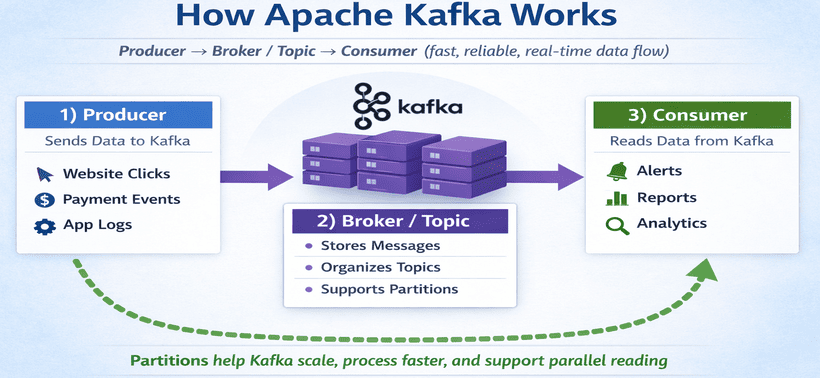
What is Apache Kafka? Apache Kafka is a system that helps different applications send and receive data instantly.
How Apache Kafka Works
Apache Kafka Definition
Apache Kafka is a fast and reliable platform used to move data from one system to another in real time. It acts like a middleman that collects messages from one application and delivers them to other applications without losing data.
In simple words, Kafka works like a central pipeline or message hub where one application can send data, and other applications can read that data whenever needed. It is mainly used when a large amount of information needs to move quickly and reliably between systems, such as live notifications, logs, user activity, payments, or real-time tracking.
Kafka is popular because it can handle huge amounts of data, work very fast, and continue running even if one server fails.
Key Capabilities and Features
- Event Streaming: Kafka captures data in real time from sources such as websites, sensors, application logs, and database updates.
- Easy message sharing: It allows one application to send messages and another to receive them without both being directly connected.
- Durability and storage: Kafka stores messages safely for a period of time, so they can be read again later if needed.
- High Throughput: It is designed to handle a very large number of events quickly and with low latency.
Producer → Kafka Topic → Consumer
Fast + Reliable + Scalable + Real-time
Core Concepts of Apache Kafka
-
Producer: A producer is the application or system that sends data to Kafka.
In simple words, it is the sender of messages. Whenever some new information is created,
the producer pushes that information into Kafka.
Examples include a website sending user click data, a payment system sending transaction details, an app sending login activity, or a sensor sending temperature readings.
Easy definition: A producer is any application that creates data and sends it to Kafka. -
Consumer: A consumer is the application or system that reads data from Kafka.
In simple words, it is the receiver of messages. It takes the data sent by producers and uses it for
tasks such as showing notifications, saving data in a database, generating reports, or processing logs.
Examples include a notification service reading Kafka messages and sending alerts, a reporting system reading sales data for dashboards, a database service storing events, or an analytics system using user activity for analysis.
Easy definition: A consumer is any application that reads and uses data from Kafka. -
Broker: A broker is a Kafka server that stores data and handles message flow.
In simple words, a broker is like a manager or middle server inside Kafka. It receives messages from
producers, stores them, and makes them available to consumers.
Kafka usually does not run on just one broker. It runs on multiple brokers together, which is called a Kafka cluster. This helps Kafka work faster and remain available even if one server fails.
For example: Producer sends data → Broker receives it → Broker stores that data → Consumer asks for data → Broker sends it.
Easy definition: A broker is a Kafka server that stores messages and delivers them to consumers. -
Topic: A topic is a named category or channel where data is stored in Kafka.
In simple words, a topic is like a container for similar types of messages. Producers send data to a topic,
and consumers read data from that topic.
You can think of a topic like a folder, a channel, or a data stream name. Examples include user-login for login events, orders for order data, payments for payment transactions, and website-clicks for user activity.
Easy definition: A topic is a named place in Kafka where related messages are stored. -
Partition: A partition is a smaller part of a topic.
In simple words, Kafka divides a topic into multiple parts called partitions so that data can be stored
and processed more efficiently.
This is useful because if all data stays in one place, it becomes slow when the data grows. Partitions help Kafka handle more data, process messages faster, allow multiple consumers to work in parallel, and improve scalability.
For example, if you have an orders topic, Kafka can divide it into 3 or more partitions. This allows different consumers to read different partitions at the same time.
Easy definition: A partition is a smaller section of a topic that helps Kafka handle large data faster and in parallel.
User Friendly Definitions
- Producer: An application that sends messages to Kafka.
- Consumer: An application that reads messages from Kafka.
- Broker: A Kafka server that stores and manages messages.
- Topic: A named stream or category where messages are stored.
- Partition: A smaller part of a topic that helps Kafka scale and process data in parallel.
Producer = sender
Consumer = reader / receiver
Broker = Kafka server
Topic = message category
Partition = smaller part of a topic
